
How Motion Capture Works in Video Games: Full Mocap Guide 2026
Motion capture in video games used to be a niche specialty - dark rooms, ping-pong markers, and weeks of cleanup before anything moved on screen. In 2026, it’s a mainstream production tool that powers everything from gritty performance in AAA titles to indie cinematics, live events, AR filters, and stylized animation. Pipelines are faster, hardware is more accessible, and AI is reshaping what “markerless” actually means.
This deep dive is a practical guide to modern motion capture for studios of all sizes: what the capture families are, how the process actually works step by step, which tools matter, how to plan a session that integrates cleanly with Unreal Engine or Unity, and what capture costs at each budget tier. For adjacent reading, see our guides to timing in animation and video game concept art.
Key takeaways
- Motion capture in video games is a spectrum: optical, inertial, markerless (AI), facial, and hand capture - most productions blend several on one show.
- The core loop never changes: record the performance, solve it into skeletal data, clean it, retarget it to the game rig, blend it with procedural animation.
- Capture buys three things: real physical weight, hours of animation per shooting day, and library consistency. Stylised motion, non-human anatomy, and short precise beats are still hand-keyed.
- AI markerless has matured: Move.ai, RADiCAL, DeepMotion, and Plask are a real entry point for indies and previs, not just a toy.
- MetaHuman Animator with UE5.6 delivers high-fidelity facial capture from mono cameras, including ordinary webcams and some Android phones.
- Hybrid is the new standard: one stage running markers and AI markerless tracking in parallel, as with OptiTrack and Captury.
- Virtua Fighter 2 (1994) was the first game to animate fully 3D characters from captured performance; L.A. Noire brought facial capture to the mainstream in 2011.
- Outsource vs in-house: build in-house when mocap is the heart of your pipeline, outsource when you need a few high-quality sequences without growing headcount.
What is motion capture in video games?
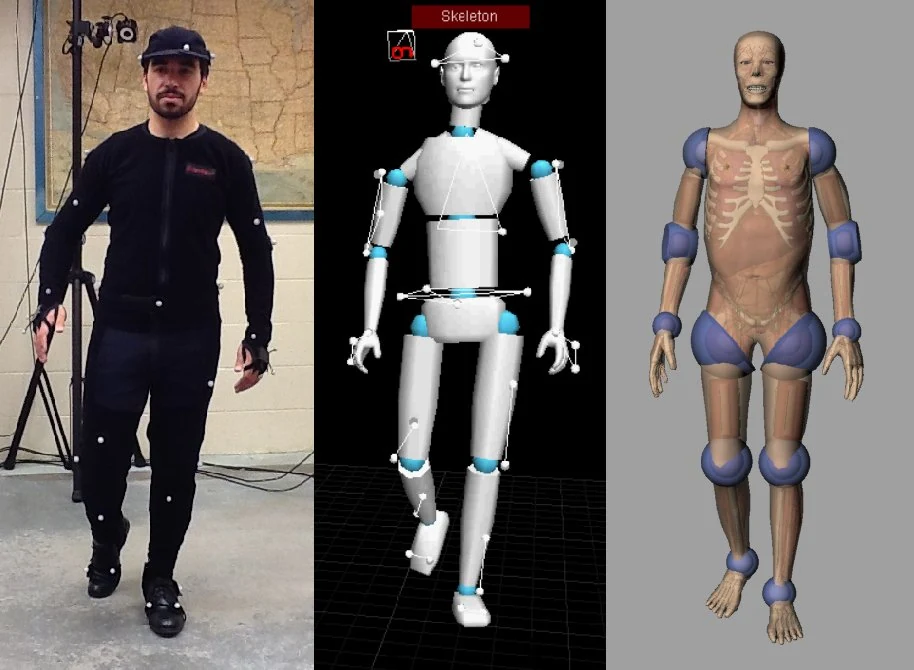
Motion capture, or mocap, is the process of recording a real performer’s movement and converting it into animation data that drives a 3D character. In video games that data becomes the locomotion, combat, and cutscene animation you see on screen: a walk cycle sampled from an actual walk, a sword swing sampled from an actual stunt performer.
The term now spans several capture families, often blended on a single show:
Optical marker-based systems
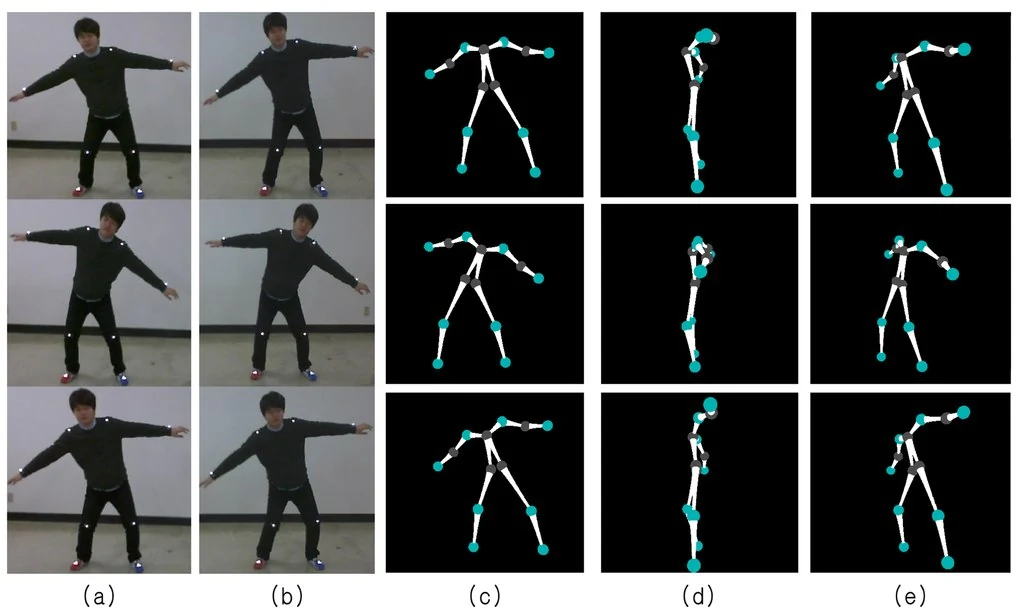
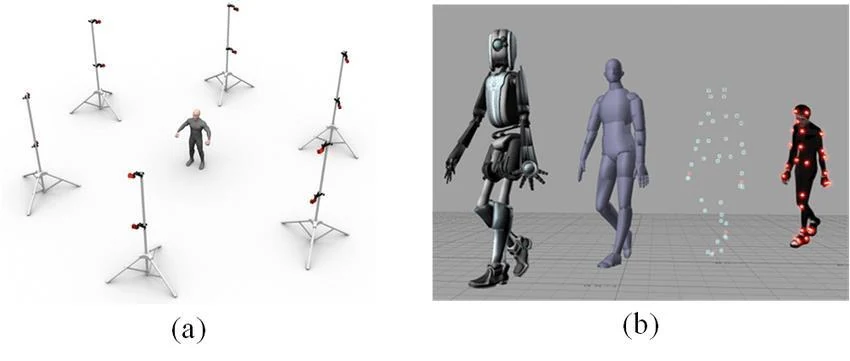
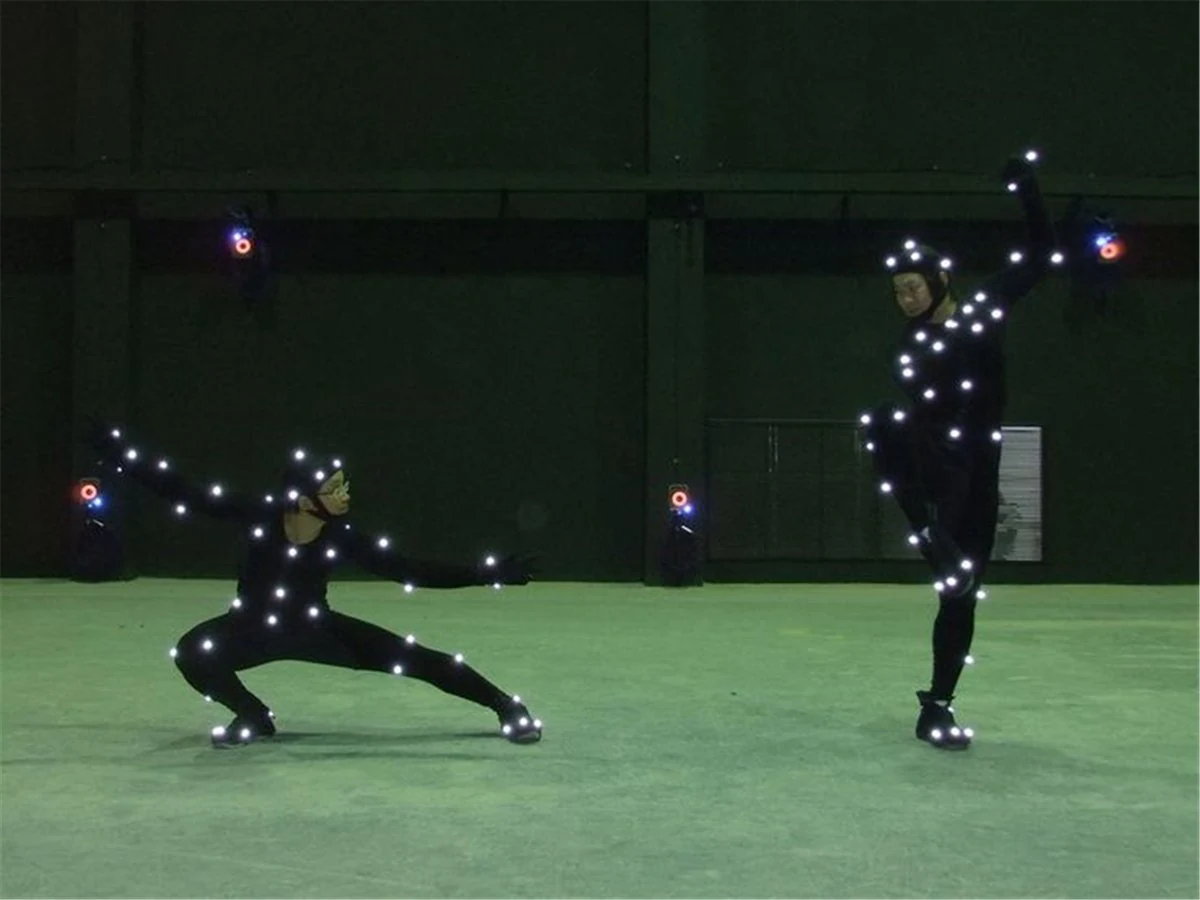
The classic studio setup - arrays of IR cameras track retroreflective markers on a performer’s suit. Vendors like Vicon and OptiTrack lead here, with robust software for solving skeletal motion and managing large stages. Recent updates focus on higher framerates, cleaner solves, and bigger volumes with simpler setup. Vicon’s platform continues to evolve across Shōgun/Nexus/Tracker with firmware enabling higher-speed modes on supported cameras, while OptiTrack has refreshed camera lines and Motive software to simplify large stages and data hygiene.
Inertial suits
Wireless IMU-based solutions (e.g., Xsens / Movella) let you capture anywhere - soundstages, offices, outdoor locations - without optical occlusion headaches. They’re ideal for fight work, field shoots, and small teams. The current MVN software line continues to add integrations (including VR trackers) and performance refinements, with 2024 releases bringing compatibility updates and workflow improvements.
Markerless AI capture
Computer-vision systems estimate full-body motion from standard video - sometimes a single camera. Tools like Move.ai and RADiCAL run from webcams or phones, lowering the barrier for previz, indie teams, and rapid iteration. Accuracy has improved dramatically, and hybrid workflows (AI solve plus quick cleanup) are now viable for stylized and mid-fidelity needs. There’s a full tool comparison further down.
Facial capture
Two main routes dominate: pro-grade video/ML pipelines such as Faceware Analyzer/Retargeter, and device-driven depth/vision frameworks like Apple ARKit (via TrueDepth or rear camera body tracking) used directly or through integrations (e.g., Live Link Face, Reallusion iPhone Live Face). Epic’s MetaHuman Animator sits in the middle, now supporting high-fidelity facial animation from mono cameras - including many webcams and Android phones - direct to Unreal.
Hands and fingers
Dedicated gloves add believable interaction - grips, typing, magic gestures - without hand-keyframing every beat. Manus Quantum Metagloves stream fingertip data into Unreal/Unity/MotionBuilder and integrate with optical pipelines; StretchSense gloves stream clean hand capture and now interface directly with OptiTrack/Vicon toolchains, cutting post time.
Most productions blend these: optical body + glove fingers + facial via MetaHuman or Faceware, with inertial or AI markerless used for reshoots, previs, stunts, or on-location pickup.
Why use motion capture in video games?
Studios use motion capture because it buys three things hand-keyframed animation struggles to deliver at scale: real physical weight, hours of usable animation per shooting day, and consistency across a library built by many animators. The trade is control - captured data arrives as it was performed, not as you wish it had been.
Weight is the one players feel without naming it. A captured sprint carries the performer’s real mass shifting over each footfall, and a captured stumble carries the correction that follows it. Those micro-adjustments are what animators spend the most time faking and audiences read fastest as fake.
Volume is the one producers feel. A single optical day can yield hundreds of usable clips - a full locomotion set, a combat tree, a library of idles. Hand-keyframing the same coverage runs into weeks per character, which is why any game with a large moveset and a real deadline captures.
Consistency matters on long projects. Twenty animators hand-keyframing the same walk produce twenty slightly different walks. Twenty clips retargeted from one performer’s session share a physical signature, so characters read as inhabiting the same world.
Where hand-keyframing still wins:
- Stylised and exaggerated motion. Squash, stretch, and impossible timing are choices, not recordings. Capturing a cartoon punch gives you a real punch, which is the wrong reference.
- Non-human anatomy. Dragons, spiders, and mechs have no performer to sample. Capture can inform the timing, but the motion is authored.
- Short, precise beats. A three-frame weapon flourish is faster to key than to schedule, shoot, solve, and clean.
- Readability under gameplay constraints. A telegraph that must be legible in 200 milliseconds from any camera angle is usually built, not captured.
The practical answer is almost never one or the other. Capture the base layer for weight and volume, then key on top of it for clarity and character.
How does motion capture work in video games, step by step
Motion capture in a video game works in six stages: calibrate the setup, record the performance, solve it into a moving skeleton, clean the result, retarget it onto the game rig, and integrate it into the animation system. The sequence is identical whether you shoot on a 40-camera optical volume or a single phone - only the fidelity and the cleanup time change.
1. Calibration and setup. Cameras are calibrated against a known volume, or the performer’s proportions are measured into a subject file. Skip this and every downstream step inherits the error - limbs come out the wrong length and foot contacts float.
2. Recording the performance. The actor performs on a stage with markers, in an IMU suit, or in front of plain video cameras. Takes are slated and logged exactly like live action, because an animator will need to find take 14 six weeks later.
3. Solving. Raw data - marker positions, IMU orientations, or video frames - is turned into a moving skeleton. Optical solvers label each marker and fit a joint hierarchy to it, inertial systems fuse sensor data, and markerless systems infer joint positions with a neural network. This is the stage where a sloppy shoot becomes visible.
4. Cleanup. Gaps from occlusion get filled, jitter gets filtered, and foot contacts get locked so the character stops sliding across the floor. On a good take this is minutes per clip; on a bad one it is hours, which is why setup discipline pays for itself.
5. Retargeting. The solved skeleton rarely matches your game rig, so the motion is mapped onto the character - Control Rig in Unreal, HumanIK in Maya, or a retarget asset in Unity. Bone naming, rest poses, and limb proportions decide whether this step is invisible or produces elbow pops and shoulder shears.
6. Engine integration. The retargeted clip enters an animation graph, where it gets blended with other clips, driven by IK for foot placement and aim offsets, and layered with procedural motion. A captured walk is raw material; the animation system is what makes it respond to gameplay.
Facial and finger data travel the same path on separate tracks, then get merged against shared timecode so the face, hands, and body belong to one performance rather than three.
The first video game to use motion capture
The first video game to use motion capture was Virtua Fighter 2 in 1994, though rotoscoping had already borrowed real motion five years earlier. Prince of Persia (1989) traced its animation from video of Jordan Mechner’s brother running and jumping - genuine movement, but drawn by hand frame by frame rather than recorded as data a computer could retarget.
True motion capture arrived with Virtua Fighter 2 (Sega AM2). Yu Suzuki’s team wanted fighting animation with real weight, and at the time the technology existed almost nowhere outside health care. Suzuki has said they went to US Army simulation vendors - the only other organisations with the hardware and any willingness to share it. Virtua Fighter 2 became the first game to animate fully 3D, texture-mapped characters from captured performance. Rise of the Robots, released the same year, had applied mocap to 2D sprites.
Facial capture took another 17 years to get its landmark. L.A. Noire (2011) shot every performance with Depth Analysis’s MotionScan, a dedicated multi-camera rig that captured the actor’s face as animated geometry rather than as data driving a rig. The approach was too heavy to reuse and the results dated quickly, but it proved that players would study a game character’s face for a lie.
From there the trajectory is continuous: full performance capture in Uncharted and The Last of Us, body-plus-face pipelines in Detroit: Become Human and Death Stranding, and now facial capture that runs off a phone.
Games with motion capture: notable examples
Motion capture shows up in almost every AAA game with human characters, but the interesting cases are the ones where it changed how the game was built rather than just how the cutscenes look. The eight below span three decades and cover the full range: fighting moves, interrogation faces, ambient crowd behaviour, combat gameplay, and machine learning trained on captured matches.
| Game | What was captured | Why it matters |
|---|---|---|
| Virtua Fighter 2 (1994) | Full-body fighting moves | First game to animate 3D characters from captured performance |
| L.A. Noire (2011) | Facial performance via MotionScan | Interrogation gameplay built on readable faces |
| Death Stranding (2019) | Performance capture of a film cast | Facial fidelity used as a marketing asset in its own right |
| Red Dead Redemption 2 (2018) | Years of body and facial capture | Ambient NPC behaviour, not just cutscenes |
| The Last of Us Part II (2020) | Body and face captured together | Ensemble scenes played as scenes, not layered later |
| Senua’s Saga: Hellblade II (2024) | Roughly 70 days of combat capture alone | Capture pushed into moment-to-moment gameplay |
| EA Sports FC (Hypermotion) | Full matches in inertial suits | Feeds ML systems that synthesise context-aware animation |
| Blizzard cinematics | Body, face, and stunt work | Mocap as the base layer under heavily stylised polish |
Two of these are worth expanding, because they point in opposite directions.
Senua’s Saga: Hellblade II is the case for capture as a design tool rather than a cutscene technique. Ninja Theory captured most in-game movement from real actors and staged extensive stunt and fight work, using performance capture to convey weight and vulnerability in moment-to-moment play. The studio reports roughly 70 full days of combat capture alone - evidence that modern pipelines can turn raw performance into the very texture of a game.
Blizzard sits at the other end. Its cinematics are heavily stylised, with proportions no human actor has, yet mocap still forms the base layer: capture the real timing and weight, then push the poses far past realism in cleanup. Stylisation is not an argument against capture - it is an argument for capturing the timing and hand-authoring the silhouette.
Planning a production-ready mocap session
Lock your destination first. If your target is Unreal Engine 5, decide upfront whether you’ll use standard skeletons (UE Mannequin, MetaHuman) or custom rigs. MetaHuman rigs accelerate facial/LOD/LOD Sync and streaming, and the latest UE5.6 rollup embeds MetaHuman tools in-engine with broader licensing that allows use outside Unreal if needed. That flexibility matters when your pipeline touches multiple DCCs.
Pick the capture stack by intent, not by brand.
- Cinematic close-ups with nuanced expression: optical body + gloves + Faceware or MetaHuman Animator.
- Gameplay moves that must be repeatable across levels: inertial + a small optical cleanup shoot for hero moves.
- Fast iteration and previz: markerless AI from phones/webcams, promoted to studio time for hero beats.
Design the stage for blocking and safety. Fight choreography, stair climbs, and prop interactions need space and durable stand-ins (foam weapons, weighted props). If you’re mixing inertial and optical, budget setup time for timecode/genlock so takes line up perfectly in edit.
Think like editorial. Treat capture like live action: slate every take, keep notes per shot, grab clean plates for reference, and roll longer than you “need” to catch natural transitions you can use in-game. Clean editorial data saves animators hours per clip.
Pre-solve risks. Test wardrobe (glossy, reflective materials can confuse optical), ensure gloves fit your performers, calibrate face rigs in the lighting you’ll actually shoot, and preflight finger/hand retargeting to the in-engine rig.
Body motion capture: choosing and combining systems
Body capture splits into three practical choices: optical for maximum fidelity in a fixed studio, inertial for shooting anywhere without occlusion worries, and markerless when speed and cost matter more than precision. Most productions run at least two, because each fails in a way the others cover. Match the system to the scene, not to the vendor.
Optical when fidelity and large ensembles matter
Optical excels at multi-actor scenes, foot contact accuracy, and long takes with complex occlusion - from crowds to creature stunts. Camera refreshes and firmware unlocks have pushed capture rates and reliability, while software like Vicon Shōgun/Nexus and OptiTrack Motive continue to streamline solving and labeling at scale. If you’re building a hero animation library for years of reuse, optical’s data quality still pays dividends.
Inertial for mobility and speed
When you need to capture in an office, on location, or with complex props that occlude markers, IMU suits shine. MVN Animate’s 2024 software releases improved device integrations and recording reliability; studios also lean on inertial for prototype-to-production previz - fast, then restage hero beats under optical for the final take.
Markerless to widen the funnel
AI-powered solve from one or two cameras is now a practical onramp for ideation, indie work, stylized projects, and remote teams. It won’t replace a full optical stage for demanding combat trees, but it changes what a small team can attempt. Tool-by-tool detail is in the next section.
Hybrid is the new normal
Even hardware vendors are blurring lines - OptiTrack’s recent tech enables simultaneous marker and AI-assisted markerless tracking in one pipeline, hinting at future “best of both” stages that maximize data quality with fewer re-takes.
Markerless and AI motion capture tools in 2026
Markerless motion capture uses ordinary video cameras and a neural network to infer joint positions, with no suit and no markers. It used to mean “good enough for previs”; in 2026 it ships in real projects, and for plenty of indie teams it is the only capture they will ever do. Five tools cover most of the field, and they differ more in pricing model than in output quality.
| Tool | Capture source | Real time | Best for | Pricing model |
|---|---|---|---|---|
| Move.ai | One phone (Move One) up to multi-camera rigs (Move Pro) | Yes, via Move Live | Multi-person scenes shot on consumer cameras | Per second of processed video, small minimum per task; free trial on iPhone |
| RADiCAL | Webcam or single video file, browser-based | Yes | Fast iteration, indie pipelines exporting to Unreal/Unity | Subscription tiers |
| DeepMotion | Video upload or live camera | Yes | Live streaming, VTubing, real-time avatars | Subscription with minute credits |
| Plask | Browser, video upload | No | Quick capture and cleanup in-browser, nothing to install | Freemium subscription |
| MetaHuman Animator | Mono camera, iPhone, or head-mounted camera | Yes, in engine | Facial capture straight into Unreal | Included with Unreal Engine |
Vendor pricing shifts constantly, so treat the model as the durable part and confirm current tiers before you budget. Move.ai is the useful example: it bills per second of processed video rather than per seat, which fits burst usage - a week of shooting followed by months of nothing - far better than a subscription does.
What markerless still will not do: dense multi-performer combat with heavy occlusion, precise prop contact, and convincing finger detail. What it does very well: locomotion, single-performer acting, previs, and anything where the real note is “show me the idea by Thursday”.
Facial motion capture: three strong paths
Facial capture in 2026 comes down to three routes: MetaHuman Animator for anything heading into Unreal, Faceware when you need studio-grade control over the solve, and ARKit on an iPhone for prototyping and indie budgets. All three now work from ordinary cameras, so the choice is about how much control you need downstream rather than what hardware you can afford.
MetaHuman Animator inside UE5
Epic’s tool has matured quickly. The 2026 MetaHuman Animator release ships with Unreal and supports capture from mono cameras - including typical webcams and certain Android phones via Live Link - enabling high-fidelity, real-time facial animation without HMCs. If your characters are MetaHumans (or rigged to compatible conventions), this is a fast, affordable path to believable faces.
Faceware for studio-grade tracking and retarget
Analyzer 3 tracks facial performance from video using ML/vision; Retargeter maps that performance to your rig in Maya/Max with a production-tested workflow. It remains a staple for cinematics, stylized shows, and teams that want deep control over solve/cleanup.
ARKit and iPhone depth capture
For indie teams and prototyping, ARKit’s face tracking and body capture APIs are battle-tested, with multiple off-the-shelf routes to stream data into DCCs and engines. Depth sensors and robust face meshes make it a reliable “always-in-your-pocket” capture option.
Hands and fingers: the missing 10% that sells contact
Finger capture is the cheapest large upgrade in believability. A body take can be flawless and still read as fake the moment a hand closes around a sword hilt with the wrong grip, because contact is what the eye checks. Dedicated gloves stream fingertip data alongside the body, so grips, gestures, and prop handling arrive already synchronised instead of being keyed afterwards.
Well-animated fingers transform prop work, gadgets, and UI.
- Manus Quantum Metagloves provide absolute fingertip tracking, timecode/genlock, and direct Unreal/Unity plugins - plus hooks into optical pipelines for synchronized takes.
- StretchSense streams lifelike hand data directly into OptiTrack Motive and offers Shōgun Post scripts for Vicon, reducing stitching time and keeping hand solves consistent across a show.
When budgets are tight, capture hero shots with gloves and blend with procedural hand poses for background interactions.
Motion capture pipeline: from stage to game engine
A motion capture pipeline is the route your data takes from the stage to a playable animation: solve, cleanup, retarget, interchange format, then engine integration. Whichever engine you target, the two decisions that determine how painful the pipeline is are your skeleton convention and your interchange format. Both are cheap to fix before the first shoot and expensive afterwards.
Unreal Engine 5
UE5’s Live Link ecosystem, Control Rig, and Sequencer make it the fastest target for in-engine review. MetaHuman + MetaHuman Animator adds facial capture without switching tools, and the latest release folds MetaHuman directly into UE with more permissive licensing - a boon for multi-tool pipelines.
Unity
Unity remains excellent for mobile and cross-platform titles, with broad mocap plugin support (Xsens, ARKit, Manus, etc.). If your brief includes Apple Vision Pro or spatial computing, ensure material/shader parity across platform constraints during pre-prod.
Interchange
For non-real-time DCC work and review, FBX, BVH, and C3D still rule; for full character/scene transport you’ll increasingly see USD/OpenUSD and glTF in the mix - especially when moving data between departments and vendors. Your retarget step is where careful skeleton decisions pay off.
Automation and retargeting
Build a repeatable retarget pipeline using Control Rig (UE) or HumanIK/Maya + Retargeter (Faceware). Small scripts that auto-label joints, apply naming conventions, and validate framerate/timecode will save you hundreds of minutes across a season.
Sports, machine learning, and data-driven animation
Annual sports titles have become testing grounds for massive capture and ML-driven animation. EA’s Hypermotion uses suit capture (Xsens) of full matches to build learning systems that generate context-aware animations, blending mocap fidelity with procedural responsiveness. The approach - capture at scale, learn from it, and synthesize variants - foreshadows pipelines many genres will adopt as animation graphs get smarter.
Motion capture in movies and film
Film pushed motion capture first and still sets the fidelity ceiling. Three productions define the arc: Gollum proved a captured performance could carry a lead role, Avatar industrialised the volume and the virtual camera, and the Planet of the Apes reboots dragged capture outdoors. Games inherited the robustness all three forced into the hardware.
Gollum in The Lord of the Rings (2002) made the case that a captured performance could carry an emotional lead role - Andy Serkis on set with the cast, not a puppeteer in a booth afterwards. Avatar (2009) industrialised it: a purpose-built volume, head-mounted facial cameras, and a virtual camera that let the director frame captured performance live. The Planet of the Apes reboots took capture outdoors onto muddy locations, which forced the marker and lighting robustness that game productions now benefit from.
The real difference from games is what happens after the solve. Film has a fixed camera and a finite shot count, so a performance can be sculpted frame by frame - and usually is. Games have to keep that performance readable from any camera angle, blended with dozens of neighbouring clips, at 60 frames per second, on hardware that also has to render the world. A film-grade take often needs more work to ship in a game than it did to ship in the film.
What changed recently - and why it matters
Four shifts over the last two years changed what a small team can attempt: facial capture moved inside Unreal and onto mono cameras, markerless stopped being a previs-only tool, optical stages started running AI-assisted tracking alongside markers, and glove data began landing in the same pipeline as body data instead of beside it. Together they lower the entry cost more than any single release did.
MetaHuman inside the engine, not alongside it
With UE5.6, MetaHuman tools ship with Unreal, add audio-driven options, and expand licensing to support use in other engines and DCCs. More importantly, the mono camera path means high-quality facial capture with commodity devices. Teams can now prototype or even ship faces without HMCs, then scale up to studio cameras for hero shots.
Markerless isn’t a gimmick anymore
Real-time browser-based pipelines let non-technical creatives test ideas and block scenes immediately. For many indie and mid-scale productions, this is the difference between “we’ll try it next sprint” and “let’s try it now.”
Optical is getting smarter and faster
Vendors are adding camera modes, lens options, and AI-assisted workflows (e.g., OptiTrack’s dual tracking mode with Captury) that reduce occlusion pain and improve solves without adding more markers. That’s time saved on set and in cleanup.
Gloves integrated directly into body pipelines
StretchSense and Manus have matured integrations with Motive/Shōgun and UE/Unity, so hand data lands where body data lives, rather than as a painful side-car. For interaction-heavy games, this raises baseline quality on cutscenes and gameplay alike.
Volumetric humans and Gaussian splats: beyond skeletons
Volumetric capture records the performance itself rather than data to drive a rig, and it is surging for experiences that want the exact person on screen. The biggest leap has been the move from NeRFs to 3D Gaussian Splatting for dynamic scenes: large gains in playback speed and fidelity, with compression improving fast.
Research like Human Gaussian Splatting and DualGS now shows real-time animatable avatars and volumetric video at sizes that start to make production sense, and industry coverage across 2025-2026 frames splatting as a “JPEG moment” for spatial media.
Volumetric isn’t a drop-in replacement for rigged characters; it’s another tool:
- Perfect for performances you want to show, not re-target - interviews, cameos, training content, stylized mixed reality.
- Increasingly viable for headset experiences, with active work on variable-rate NeRF/GS compression and real-time streaming.
If you’re exploring spatial computing or cinematic XR, consider a hybrid: skeletal characters for gameplay + volumetric “moments” for presence.
Motion capture for indie games: budget recipes
Motion capture for indie games is no longer gated by budget - it’s gated by scope discipline. A markerless tool and a phone cover more ground than a full optical day did five years ago, so the question stops being “can we afford capture” and becomes “how much can we actually clean”. Three tiers, three different answers.
Indie / first-timer path
- Block with markerless (Move.ai or RADiCAL) from a phone or webcam.
- Record key dialogue with iPhone/ARKit or MetaHuman Animator mono camera.
- Upgrade hero beats via a day in an inertial suit, and add glove pickups for close interactions.
AA / established indie
- Optical day (or days) for the locomotion library and combat sets.
- Inertial for reshoots and traversal variants.
- MetaHuman Animator or Faceware for faces; gloves on all hero shots.
AAA cinematic
- Full optical volume with calibrated props, multi-actor scenes, and face HMC or high-end video for Faceware and/or MetaHuman.
- Dedicated glove capture, techviz, and editorial on set.
- Consider volumetric pickups for teaser/marketing beats or headset tie-ins.
The mistake at every tier is the same: capturing more than you can clean. Ten well-chosen takes that ship beat four hours of footage nobody has time to retarget.
How to choose a motion capture studio
Choosing a motion capture studio comes down to six questions, and none of them are about camera count on the marketing page. What matters is whether the volume fits your scenes, what state the data arrives in, whether the retarget path was proven before the shoot day, and who owns the performance afterwards. The criteria are boring and decisive:
- Volume size and camera count measured against your actual scenes. A four-person sword fight in a small volume produces occlusion you will pay for twice - once in retakes, once in cleanup.
- What you get back. “Raw solved data” and “retargeted, engine-ready clips on your rig” are very different deliverables at very different prices. Ask which one the quote covers before comparing numbers.
- A retarget test before the shoot day. A good studio will take your rig and prove the retarget path on sample moves. If they won’t, budget for surprises.
- Face and hands. Ask specifically how facial and finger data is synchronised with the body, and on what timecode. Multi-vendor shoots fall apart here more than anywhere else.
- Actor sourcing and releases. Stunt performers, signed releases, and clear commercial rights to the data. Skipping this creates a legal problem years after the game ships.
- Data handling. Unreleased IP sitting on a vendor’s drives needs access control and an agreed retention policy written into the contract, not promised in an email.
Our own role usually sits either side of the stage rather than on it. Before capture, our 3D character design services deliver rigged, engine-ready characters built to standard mocap conventions, so retargeting works on day one instead of after a week of rig surgery. After capture, our 3D animation services take solved data and turn it into shippable animation on your rig. For broader pipelines covering environments, props, and vehicles alongside characters, our 3D pipeline team builds the full asset set.
Integration and QA: where projects succeed (or stall)
Most mocap projects do not fail on the stage, they fail in integration - mismatched units, undocumented skeletons, a retarget path nobody tested, or an animation budget the target platform cannot afford. Four checks catch nearly all of it, and every one of them is cheaper before the shoot than after. Treat them as deliverables, not as hygiene.
Data hygiene
Mandate naming conventions, skeletal maps, and unit/fps standards in your brief. Keep depot layouts simple, and add pre-commit scripts that reject bad metadata. A half-day of tooling here saves weeks later.
Retarget tests early
Before the first shoot, prove that your skeleton, Control Rig, and facial retarget path produce the expression and shoulder/hip behavior you expect. If finger curl or clavicle weighting is off, fix the rig - not the performance.
Performance checks on target platforms
If your game targets Switch, Steam Deck, or mobile, verify that your anim budget - bone counts, runtime retarget cost, IK load - fits. “It looks great in the editor” is not a shippable metric.
Security and compliance
Capture often involves licensed IP and unreleased content. Treat secure storage, access control, and audit logs as part of the deliverable - especially when multiple vendors and remote performers are involved.
Common pitfalls (and how we avoid them)
Four failure modes account for most of the cleanup time on a mocap shoot: markers lost to occlusion, a facial take that does not match the best audio take, glove drift that ruins prop contact, and rig mismatches that crack open during retargeting. None of them are exotic, and all four are cheaper to prevent on the day than to fix in post.
Occlusion chaos
Multiple performers, long props, and shields can cause marker loss. The fixes are camera placement tests, extra markers at problem joints, and - on hybrid shoots - an inertial backup pipeline for continuity.
Face/voice mismatch
An actor’s best facial take isn’t always their best audio take. Record clean wild tracks and keep face plates rolling longer for natural transitions. If you use MetaHuman Animator or Faceware, capture in the lighting you will actually use; tracking hates surprises.
Hand drift
Even small miscalibrations in gloves produce uncanny prop holds. Run quick “object fidelity” passes on set - cup, sword, book - then validate in engine with the final prop scale.
Retarget cracks
Rig mismatches create elbow pops and shoulder shears that take forever to polish. Our fix: a locked “retarget test kit” scene with looped sample moves and automated checks. If the kit passes, shoot. If not, fix the mapping first.
Where mocap is heading over the next year
The direction of travel is capture becoming ambient rather than scheduled. Facial capture is moving off the stage and onto whatever camera the actor already has, optical volumes are adding markerless tracking in parallel, finger capture is shifting from optional to default on hero work, and volumetric moments are becoming practical outside VR. Less booking, more iteration.
Capture everywhere
With MetaHuman Animator supporting mono cameras and broader licensing, facial capture will move out of the stage and into wherever the actor is. That means more iteration and better performances.
Hybrid optical + AI
Expect more volumes to run simultaneous marker and markerless pipelines to reduce occlusions and speed cleanup - less hand labeling, more takes per day.
Hands become standard
As gloves integrate more deeply with body pipelines, finger capture will shift from “nice to have” to “default for hero work,” especially in first-person and interaction-heavy titles.
Volumetric “moments” in mainstream games
Gaussian Splatting and efficient NeRF playback will make cameo volumetric shots practical even outside VR - openings, dream sequences, or mixed-reality marketing beats.
Final take
Motion capture in 2026 is about choice. You can capture a heartfelt close-up with nothing but a webcam and UE5’s MetaHuman Animator; you can stage a multi-performer sword fight on an optical volume; you can prototype traversal with an inertial suit in your parking lot; you can even bottle a moment volumetrically with Gaussian splats. The right blend depends on your story, your gameplay, and your deadlines.
Whichever blend you pick, capture only works if the character underneath it is built for it. If you need rigged, engine-ready characters that retarget cleanly on day one - or solved data turned into shippable animation on your rig - our 3D character design services and game animation team handle both ends of the stage. Tell us what you’re capturing and we’ll tell you what the rig needs.