
How Game Characters Are Made: Pipeline, Timelines and Costs
Ask three studios how game characters are made and you will get three different pipelines, but the stages underneath are the same: a brief, a concept, a model or a drawing, textures, a rig and a check inside the engine. What changes between a casual 2D hero and a realistic console character is how long each stage takes, who signs it off and what it costs.
This guide walks through that pipeline from the client’s side. We have built characters for Nexters’ Hero Wars, Owlcat Games’ Pathfinder, Helio Games’ Amikin Survival and our own internal projects, and the examples below come from that client work and from our internal projects. By the end you should know what you are paying for at each stage, where a character can go wrong, and how to brief a studio so that it does not.
Key takeaways:
- A game character is typically made in seven stages: brief, concept, sculpt or final drawing, retopology and baking, texturing, rigging, engine check. Each stage ends with a sign-off.
- The concept stage decides the budget. A design change at the silhouette stage costs an hour; the same change after the sculpt costs days.
- Indicative 2026 prices: a 2D hero $200-1,000, a simple stylized 3D character, modelled and textured, from $350, a realistic PBR character $1,300-5,300.
- Timelines: a 2D hero in one to two weeks, a stylized 3D character in two to four weeks, a realistic hero in five to ten weeks, with client reviews the biggest variable.
- Game-ready means the character works in the engine: triangle budget, clean UVs, baked materials, a rig with skin weights, LODs and correct scale, not a good-looking render.
What the Game Character Pipeline Covers
The game character pipeline turns a written idea into an asset that runs in the engine, not just one attractive image. For a 3D game that covers concept, sculpt, retopology, UVs, baking, textures, rig and LODs. For a 2D game it covers concept, a character sheet, final rendering and, if the game animates characters, preparation for a tool like Spine.
The order matters because every stage locks something in. The brief locks the gameplay role and the technical limits. The concept locks the design. The sculpt locks the forms. Retopology locks the polygon budget. The rig locks how the character moves. Clients who understand this order stop asking for “a small change” at the texturing stage that actually means a new sculpt.
| Stage | What you receive | What it locks in |
|---|---|---|
| 1. Brief and references | A one-page brief, style references, technical limits | Role, platform, polygon and texture budget |
| 2. Concept art | Silhouettes, a refined sketch, a color turnaround | The design |
| 3. Sculpt or final 2D art | A high-poly model, or the finished drawing for 2D | Forms, proportions, costume detail |
| 4. Retopology, UVs, baking | A low-poly mesh with normal and AO maps | Polygon count, deformation quality |
| 5. Texturing | PBR or hand-painted texture sets | Surface look, memory cost |
| 6. Rigging and skinning | A skeleton, skin weights, control rig | Range of motion, animation cost |
| 7. Engine check and delivery | LODs, prefab or blueprint, source files | Performance, naming, scale |
Stage 1: The Brief and References
A good character brief fits on one page and answers five questions: who the character is in the game, how the player sees it, what platform it ships on, what style it must match, and what technical limits apply. Everything a studio cannot find in the brief it has to ask about or assume, and assumptions that surface late get revised at both sides’ expense.
A good studio asks about the gaps; a brief that answers them in advance saves that round. The gameplay role comes first. A match-3 shopkeeper who appears in dialogue windows needs expressions and two or three poses, not a full-body rig. A third-person hero who fills the screen in cutscenes needs a facial rig, hair and cloth that survive close-ups. A mobile RPG enemy that spawns twenty times per battle needs a tiny triangle budget and one texture set.
Camera distance decides the detail level. Characters seen from an isometric camera at 150 pixels tall do not need pores or stitching, and paying for them is wasted money. The same character in a 4K cinematic needs both. Tell the studio the smallest and the largest size at which the character will be seen.
Technical limits belong in the brief, not in a later email: triangle count, number of texture sets and their resolution, the skeleton the character must share with existing animations, and the engine version. If you do not have numbers yet, say so, and the studio will propose them. Style references should come from your own game or a style guide first; our breakdown of game art styles explains what each style costs to keep consistent across a cast.
Stage 2: Concept Art, from Silhouettes to Turnaround
Concept art is where the character is designed, and it runs in three passes: silhouettes, a refined sketch and a turnaround. The silhouette pass produces ten to twenty small shapes without detail, so that you choose a direction by form alone. One or two of those become refined sketches with costume and face. The winner becomes a turnaround: front, side and back views, with color, that the 3D team can model from without guessing.
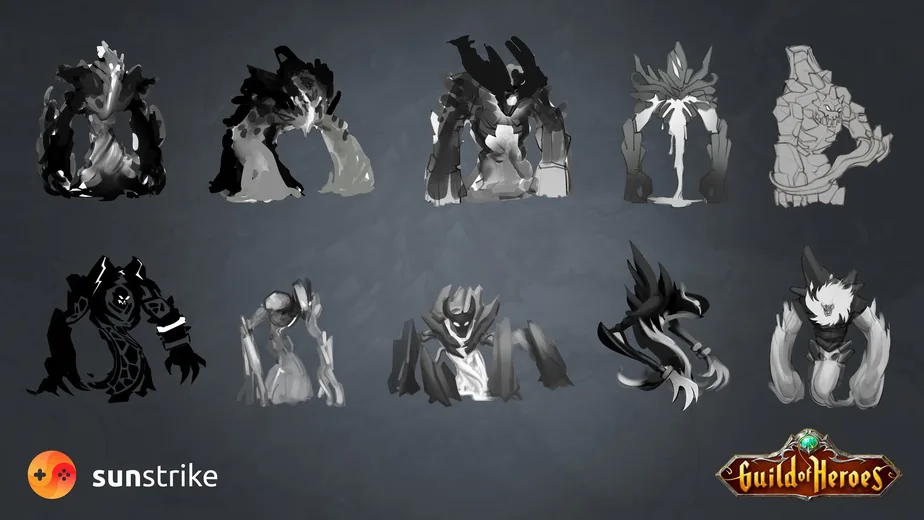
The silhouette pass is the cheapest moment in the whole pipeline to change your mind, so use it. Ask for variety rather than polish: a tall version, a wide version, one built from triangles, one from circles. Pick by what reads at thumbnail size, because that is how most players will see the character in a crowded scene.
The turnaround is the handoff document. It fixes proportions, where each costume piece attaches, the color palette and the materials. A modeler working from a single three-quarter illustration has to invent the back of the character, and the invention will not match what the art director imagined. If your studio delivers a concept without a turnaround, the sculpt will cost more than you saved.
For this stage the studio needs your feedback within a day or two per pass. If approval takes a week, the character takes a month longer and nobody has done anything wrong. We describe how to structure concept reviews and a paid test in our guide to concept art outsourcing.
The 2D Route: Character Sheet, Final Art and Spine Prep
For a 2D game the approved concept turns directly into the production asset, so the pipeline continues after the turnaround into a character sheet, final rendering and, for animated games, layer preparation for Spine. There is no sculpt, no retopology and no texture set, which is why a 2D hero costs a fraction of a 3D one and ships in one to two weeks.
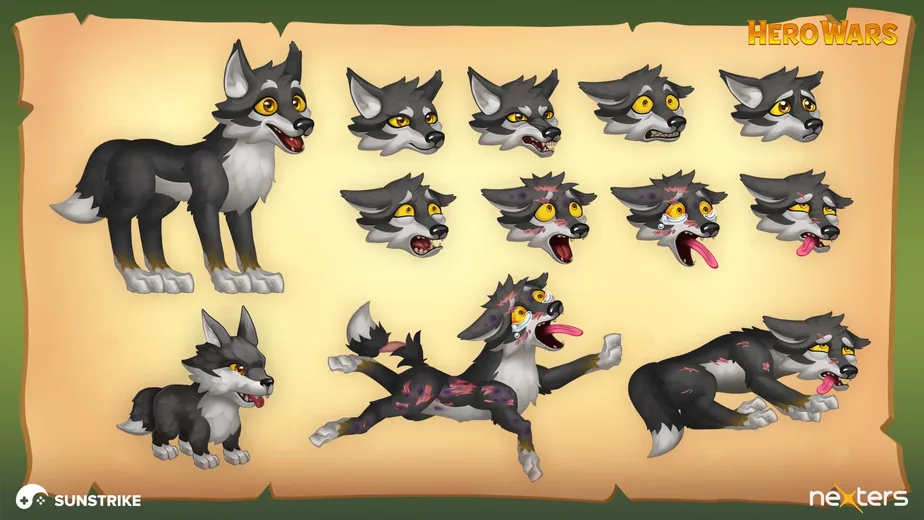
The character sheet is the design reference for everything drawn later: the model pose, the expressions the story needs and the action poses the gameplay needs, so that any artist can draw the character without drifting from the design. For live-ops games this sheet is what keeps the fortieth seasonal skin consistent with the first hero.
Final rendering happens at the size the game shows. A story character for dialogue windows is painted at two or three times its on-screen height so that it survives retina displays; a tiny map unit is painted at a lower resolution with thicker shapes. Painting every character at poster size wastes hours and produces assets that look muddy when scaled down.
If the game animates characters with Spine or a similar tool, the final art is delivered cut into layers: head, torso, upper and lower arms, hands, and separate mouth and eye states. That cut changes how the character is painted, because the artist has to draw what is hidden behind each layer. The Spine rig itself, with bones, weights and animations, is a separate stage with its own estimate. Tell the studio about animation before the final rendering starts, not after: our 2D character design team builds the sheet and the layer cut in one pass for exactly this reason.
Stage 3: Blockout and High-Poly Sculpt
The 3D character pipeline starts with a blockout, a rough model of primary forms that checks proportions against the concept, and continues into a high-poly sculpt where the character gets its anatomy, costume and surface detail. The sculpt can run to millions of polygons; it is the source of truth for the look, not the asset that ships.
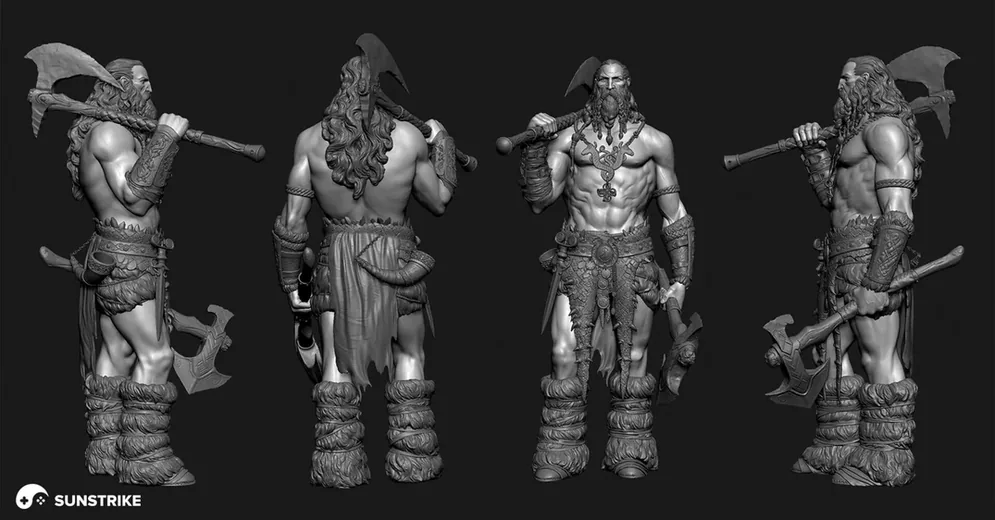
The blockout deserves its own review. At this point the character is grey, has no face detail and takes a day or two, so moving the shoulders, lengthening the legs or changing the silhouette of a coat costs almost nothing. After the sculpt is detailed, the same changes mean re-sculpting folds, straps and ornaments around the new shape.
The sculpt itself is organised in layers of detail: primary forms (body masses and major costume pieces), secondary forms (muscle groups, folds, buckles) and tertiary detail (pores, stitching, scratches). For a stylized mobile character the tertiary layer is skipped entirely, which is one reason stylized characters are cheaper. For a realistic hero it is where most of the sculpting hours go.
Stylized and realistic characters diverge most at this stage. Realistic work leans on anatomy references, scans and measured proportions; stylized work leans on the concept’s shape language and deliberate exaggeration. Both need an art director who signs off on the sculpt before retopology starts, because retopology freezes the forms. Our guide to realism versus stylization covers how to make that call for a whole project.
Not every character takes the full route. Simple mobile characters are often modelled low-poly directly from a base mesh, realistic humans can start from a scan, and some teams settle the design in a 3D blockout instead of a 2D turnaround. The sign-off principle stays the same: forms are approved before anyone spends days on detail.
Stage 4: Retopology, UVs and Baking
Retopology is the step in the character modeling pipeline that rebuilds the sculpt as a clean low-poly mesh the engine can run, with edge loops along joints and facial muscles so the character deforms well. The high-poly detail is then baked into normal and ambient occlusion maps, plus helper maps for texturing, so a 20,000-triangle character keeps most of the sculpt’s surface detail at normal distance; the silhouette stays low-poly, so topology and LODs still matter.
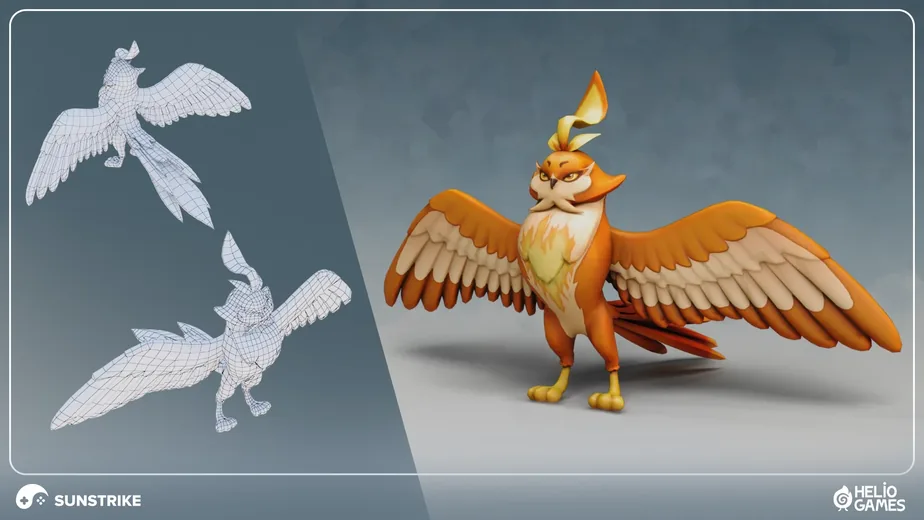
The polygon budget comes from the platform and the number of characters on screen, and it should be in the brief. Typical starting budgets we work to in 2026, for LOD0 without weapons and attachments:
| Target | Triangles per character | Texture sets |
|---|---|---|
| Casual mobile, stylized | 3,000-15,000 | One set at 1K-2K |
| Mid-core mobile and stylized PC | 15,000-40,000 | One or two sets at 2K |
| Realistic PC and console hero | 50,000-150,000, more with Nanite | Several 4K sets: body, head, cloth, hair |
The final numbers depend on the target device, frame rate, how many characters share the screen and what counts as the character: hair, weapon and cloth often carry their own budgets.
Unreal’s Nanite virtualized geometry softens the triangle ceiling on PC and console, first for static meshes and, since Unreal Engine 5.5, for skeletal meshes as well, where it replaces geometric LODs with its own streaming. Mobile targets and most other engines still work to a fixed budget, and a skinned mesh still needs clean topology to deform well, so retopology has not gone away; its budget has moved. A topology that bends badly at the elbow or pinches at the mouth cannot be fixed by textures, so we review the wireframe in a few test poses before baking. For projects that only need this stage, retopology is a common standalone order for our 3D game art outsourcing team: a client sends sculpts or scans and receives game-ready meshes.
UV unwrapping follows retopology. Seams are hidden along the inside of limbs and under costume edges, texel density is weighted by what the player looks at, so a face seen in close-up gets more resolution than the boots, and mirrored parts can share UV space deliberately to save texture memory, as long as the texturing plan allows it. The baking pass then transfers the sculpt detail onto those UVs. If you want to understand what polygon count buys you, our comparison of low-poly and high-poly game art goes into the trade-offs.
Stage 5: Texturing and Materials
Texturing gives the low-poly mesh its surface: skin, cloth, leather, metal and the wear that tells the character’s story. Most 3D games use PBR texture sets (base color, roughness, metallic, normal, plus ambient occlusion) so that materials respond correctly to the game’s lighting. Stylized games often hand-paint light and color into the base texture instead and use a lighter material setup.
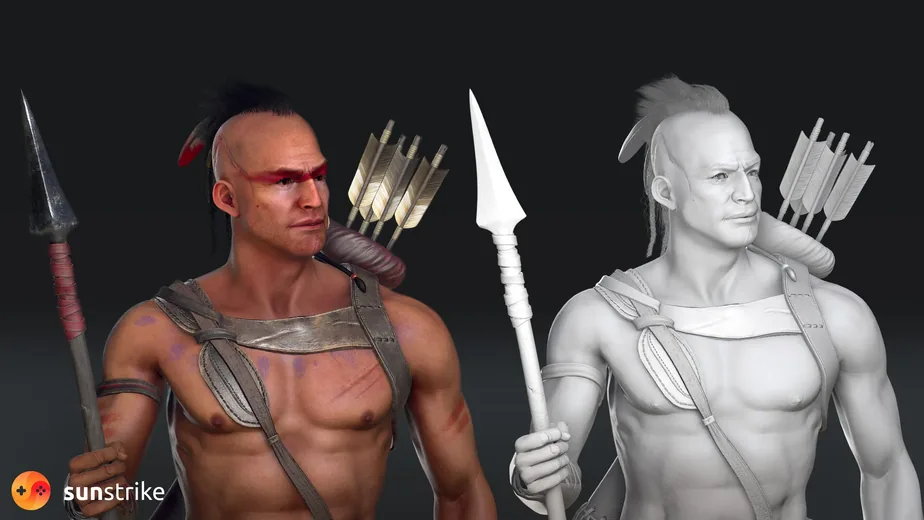
The texturing stage is where a character starts to look finished, which is exactly why clients want to give feedback here, and why that feedback is so expensive if it touches the design. Color, wear, decals and material choice are cheap to change at this stage. Anything that changes a shape is not; it goes back to the sculpt.
Resolution should match the camera distance from the brief. A 4K texture set on a mobile enemy seen at 200 pixels tall costs memory and download size for no visible gain, while a 1K set on a cinematic hero shows blur in the first close-up. Hair, eyes and skin usually get their own materials on realistic characters, and each extra material usually adds draw calls the engine pays for every frame. For a deeper look at the maps and the tools, see our guide to texturing 3D models for games.
Stage 6: Rigging, Skinning and Animation Handoff
Rigging builds the skeleton inside the character, and skinning assigns every vertex to the bones that move it. A game rig is lighter than a film rig: it uses the bone count the engine and the animation set allow, matches the skeleton the project already uses so that animations can be shared, and adds a control rig for the animators on top.
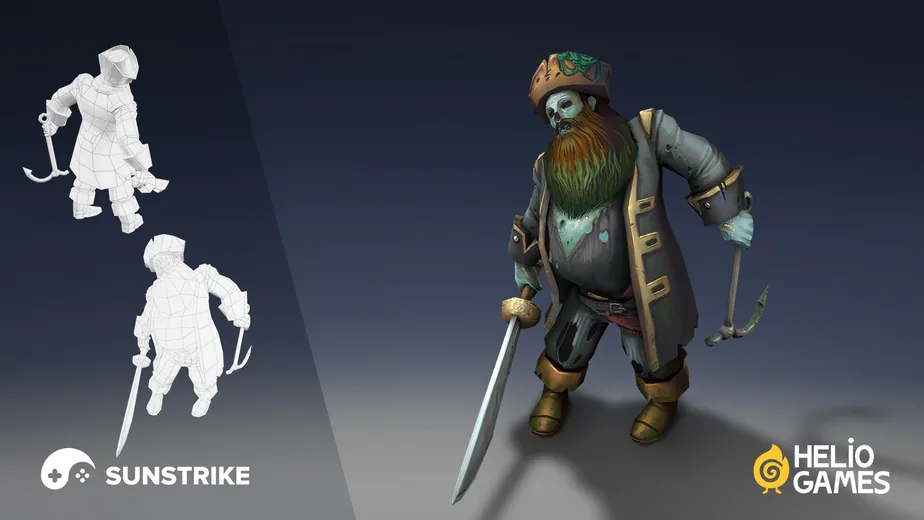
Skinning is checked in extreme poses: arms raised, knees bent, head turned, mouth open. Weights that look fine in the rest pose can collapse a shoulder or pull a belt through the stomach the moment the character moves. If the character must use existing animations directly, the rig has to match that skeleton bone for bone. A different skeleton needs a retargeting setup and a check pass, which costs time but is normal work. Say which case applies in the brief and send the reference skeleton with it.
Facial rigs are a separate line in the estimate. A mobile character with four expression swaps needs blend shapes and a few bones; a hero in close-up cutscenes needs a full facial rig with dozens of controls. Both are rigging, but they can differ by an order of magnitude in hours. Epic’s documentation on the skeletal mesh animation system is a good primer on what the engine expects from a rigged character.
Animation itself is usually a separate order with its own schedule, and we cover it in our 3D animation services. What the character pipeline owes the animator is a rig that has already been tested, with clean naming and a documented control set.
Stage 7: LODs, Engine Check and Delivery
The last stage puts the character into the engine and proves it works: LODs are generated and checked, materials are assigned, scale and pivot are verified, and the character is tested in a real scene with the game’s lighting and a few animations. Only after that is a character game-ready.
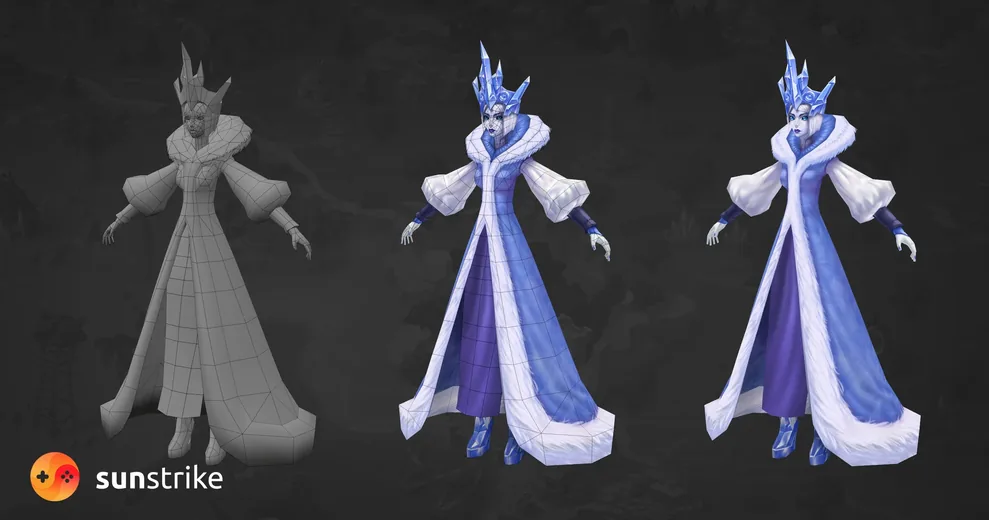
LODs (levels of detail) are simplified copies of the mesh that the engine swaps in as the character moves away from the camera. A hero might have four LODs, from the full mesh down to a few hundred triangles for a distant crowd. Unity’s manual on level of detail explains how the switching works; what matters for the client is that LODs are made and checked, because a character that pops or loses its silhouette at LOD2 looks broken on a phone.
The engine check catches what renders in Marmoset or Blender but fails in the game: scale off by a factor of 100 because of unit settings, textures in the wrong color space, a pivot at the feet when the game expects it at the hips, materials named by the artist rather than by the project convention. Our rule is that the studio does this check, not the client’s engineer, and sends a screenshot from inside the engine with the delivery, with triangle counts and the material list. Performance itself is checked in the target build with the expected number of characters on screen.
A complete delivery for a 3D character includes the engine-ready mesh with LODs, the rigged source file, texture sets in the project’s format, the high-poly sculpt, the concept and turnaround, and a short readme with triangle counts, material names and bone count. Ask for all of it in the contract: a studio that keeps the sculpt makes the next skin expensive.
Tools Used at Each Stage
The tools change from stage to stage, but a client rarely needs to own any of them. What matters is which files come out of each step and whether they open in your engine. Most studios, including ours, draw concepts in Photoshop, sculpt in ZBrush or Blender, retopologize in Maya or Blender, texture in Substance Painter and check the result in Marmoset Toolbag before it goes into Unity or Unreal.
| Stage | Typical tools | Files you receive |
|---|---|---|
| Concept art and final 2D art | Photoshop, Procreate, Clip Studio Paint | Layered PSD, PNG turnaround and character sheet |
| Blockout and sculpt | ZBrush, Blender | ZBrush or Blender project (.ztl, .blend), decimated OBJ for review |
| Retopology and UVs | Maya, Blender, 3D Coat, TopoGun | Low-poly FBX or OBJ with UVs |
| Baking and texturing | Substance Painter, Marmoset Toolbag | Texture sets as PNG or TGA, Substance project on request |
| Rigging and skinning | Maya, Blender; Spine for 2D rigs | Rigged FBX plus the Maya or Blender rig scene; for 2D the Spine project, JSON or binary export and atlas, with the runtime version noted |
| Engine check | Unity, Unreal Engine, Godot | Prefab, Blueprint or Godot scene, glTF where the engine prefers it, LOD setup, engine screenshots |
If your own team will maintain the character later, ask for the editable sources as well as the exports: the ZBrush project, the Substance file and the rig scene. Without them a new skin or a costume change starts from the exported mesh, and that turns days of work into weeks.
How Long Does It Take to Make a 3D or 2D Game Character?
A 2D hero takes one to two weeks, a stylized 3D character two to four weeks and a realistic PC or console hero five to ten weeks, counted in working days from brief to engine-ready files with reviews answered within a day or two. The table shows production days per stage for one character with one artist per stage; a cast of twenty runs in parallel and takes less per character.
| Stage | 2D hero | Stylized 3D character | Realistic 3D hero |
|---|---|---|---|
| Brief and references | 1-2 days | 1-2 days | 2-3 days |
| Concept: silhouettes to turnaround | 2-4 days | 2-4 days | 4-8 days |
| Final 2D art, or blockout and sculpt | 2-4 days | 3-5 days | 8-15 days |
| Retopology, UVs and baking | - | 1-3 days | 3-6 days |
| Texturing | - | 2-3 days | 4-8 days |
| Rig, skinning and engine check | 1 day (Spine layer prep) | 1-3 days | 4-8 days |
| Typical total, working days | 6-11 days (1-2 weeks) | 10-20 days (2-4 weeks) | 25-48 days (5-10 weeks) |
The biggest variable is not the artist, it is the review loop. The days above are production days; waiting is not in them. Every stage ends with a sign-off, and a sign-off that waits five working days adds five days to the calendar. A client with one decision-maker who answers within a day gets a stylized character in two or three weeks; a client whose feedback goes through three departments can take twice as long for the same character.
The second variable is what is already fixed. A character with an approved concept, a reference skeleton and a written triangle budget starts at stage 3 and skips two weeks of decisions. The first character in a new style always takes longest, because the style itself is being decided on it; the ones that follow in the same style go markedly faster.
How Much Does a 3D or 2D Game Character Cost in 2026?
In 2026 a 2D hero from concept to final art costs about $200-1,000, a stylized 3D character, modelled and textured, $350-3,300 and more depending on detail, and a realistic PBR character $1,300-5,300. Concept art ordered on its own runs $350-3,300 per character. These are the ranges we quote; the exact number depends on polygon budget, variants and review rounds, and our comparison of character design studios shows how specializations and budgets differ between vendors.
| What you order | Indicative 2026 price | What drives it |
|---|---|---|
| Character concept art | $350-3,300 | Number of silhouettes and refined variants, turnaround |
| 2D hero, concept to final art | $200-1,000 | Expressions and poses on the sheet, Spine layer cut |
| Semi-realistic 2D character | $250-800 | Rendering detail, number of costume variants |
| Stylized 3D character, modelled and textured | from $350 for a simple asset, up to $3,300+ with full detail | Triangle budget, texture sets, number of costume pieces |
| Realistic PBR 3D character, modelled and textured | $1,300-5,300 | Sculpt detail, hair, cloth, LOD count |
| Cast for a mobile game | $1,300-6,700+ | Number of characters, shared skeleton, skins |
| Hourly rate for character artists | $20-60 | Seniority, region, 2D or 3D |
What the starting prices cover: the $350 end is a simple stylized character, such as a small creature or a background NPC, built from an approved concept with one texture set and often from a base mesh. Rigging, skinning and facial rigs are usually a separate line in the same quote, so ask for them together with the model. Concept art priced on its own means design work with several variants and a turnaround for 3D production; the 2D hero price assumes one approved direction drawn to final.
Three things move a quote inside those ranges. The first is the technical scope: a facial rig, real-time hair or cloth simulation each add a stage with its own hours. The second is the number of variants: a hero with three skins is not three heroes, because the sculpt and rig are shared, but it is not one either. The third is the review structure: a contract with two rounds per stage is cheaper than open-ended feedback, and most studios price the difference explicitly.
Generative AI has lowered the cost of the early stages in our own production: reference boards, silhouette exploration and first texture passes go faster than they did two years ago, where the client’s policy allows AI-assisted work. The GDC State of the Game Industry 2026 survey found 36% of surveyed game industry professionals using generative AI in their work. The stages that decide quality, the refined concept, the sculpt, retopology and the rig, are still artist hours, which is why our ranges came down but did not collapse.
Where Character Production Goes Wrong
Most failed characters fail at a sign-off that was skipped, not at a stage that was done badly. The design was approved from one drawing, the budget was never written down, or the engine check was left to the client. Five patterns come up in almost every rescue project we take on:
- Approving a single illustration instead of a turnaround. The modeler invents the back and the side, the art director rejects the sculpt, and a week is lost on a drawing that would have taken a day.
- Changing the design after the sculpt. A longer coat or a different helmet at the texturing stage means new sculpting, new retopology, new UVs and a new bake. Design changes belong before stage 3.
- No triangle or texture budget in the brief. The studio builds a 60,000-triangle character for a game that renders twenty of them on a phone, and the optimisation pass costs as much as the model.
- Skipping the engine check. The character arrives as an FBX with textures, the client’s engineer imports it, and the scale, pivot, color space or material names are wrong. It renders beautifully in Marmoset and breaks in Unity.
- Ordering animation before the rig is tested. Skin weights that collapse a shoulder are found by the animator two weeks later; the weights get fixed and every clip has to be rechecked, and redone if the skeleton or controls change.
Each of these is a process failure, and each is prevented by a line in the brief and a review on the calendar. That is why the stage table at the top of this guide lists what each stage locks in: if you know what is frozen, you know when to speak.
How to Order a Game Character from a Studio
Order a character by stages, with a sign-off at each one, and start with a paid test on a real character from your game. A brief, a concept approval, a sculpt or sheet approval, a rig check and an engine check give you five points where you can redirect the work before it gets expensive, and a studio that resists that structure is telling you something.
The brief should contain the five answers from stage 1, the reference skeleton if there is one, and the two or three characters from your existing cast that the new one has to sit next to. Add the camera distance and the platform. If you do not know the triangle budget, ask the studio to propose one and explain it.
For the test, pick a character that represents the roster, not the easiest one. For a stylized project a complete test character takes two to three weeks and tells you how the studio handles concept, sculpt and rig. For a realistic project, test one stage, such as a sculpt from your approved concept, rather than waiting ten weeks for a full character. Compare how each studio handled feedback, not just the final image; we go through a six-step selection in our comparison of character design studios.
Agree on deliverables in writing: source files, the high-poly sculpt, texture sets in your format, LODs and a readme. Agree on review rounds per stage. Agree on who owns the art and when the transfer happens. The contract questions are the same as for any art outsourcing, and our 3D game art outsourcing guide covers them in detail.
The Takeaway
Game characters are made in seven stages, and every one of them freezes a decision that the next stage builds on. The cheapest moment to change anything is the silhouette pass; the most expensive is after the rig. Clients who review quickly at each sign-off get characters in far less calendar time than clients who review everything at the end.
Budget by stage, brief by platform and camera distance, and judge a studio by the test character that survives your engine, not by its showreel. The numbers in this guide are 2026 ranges; your quote will depend on your polygon budget, your variants and your review structure.
If you are building a cast now, our portfolio shows the stages above on real projects, from silhouettes for Guild of Heroes to game-ready characters for Amikin Survival. Send us a brief with the gameplay role, platform, style references and the character’s on-screen size, and our 2D character design or 3D character modeling team will scope a paid test on a character from your game.